High-performance Asus laptops such as ROG Zephyrus, ROG Strix, TUF Gaming and ProArt StudioBook series
draw a lot of power under load. Their original 240 W adapters are designed to feed powerful CPUs
and GPUs without throttling. If your original power brick is lost, damaged or no longer reliable, you
need a compatible 20V 12A 240W Asus AC adapter with the correct 6.0 mm x 3.7 mm connector.
This article walks through the complete buying journey for the following product:
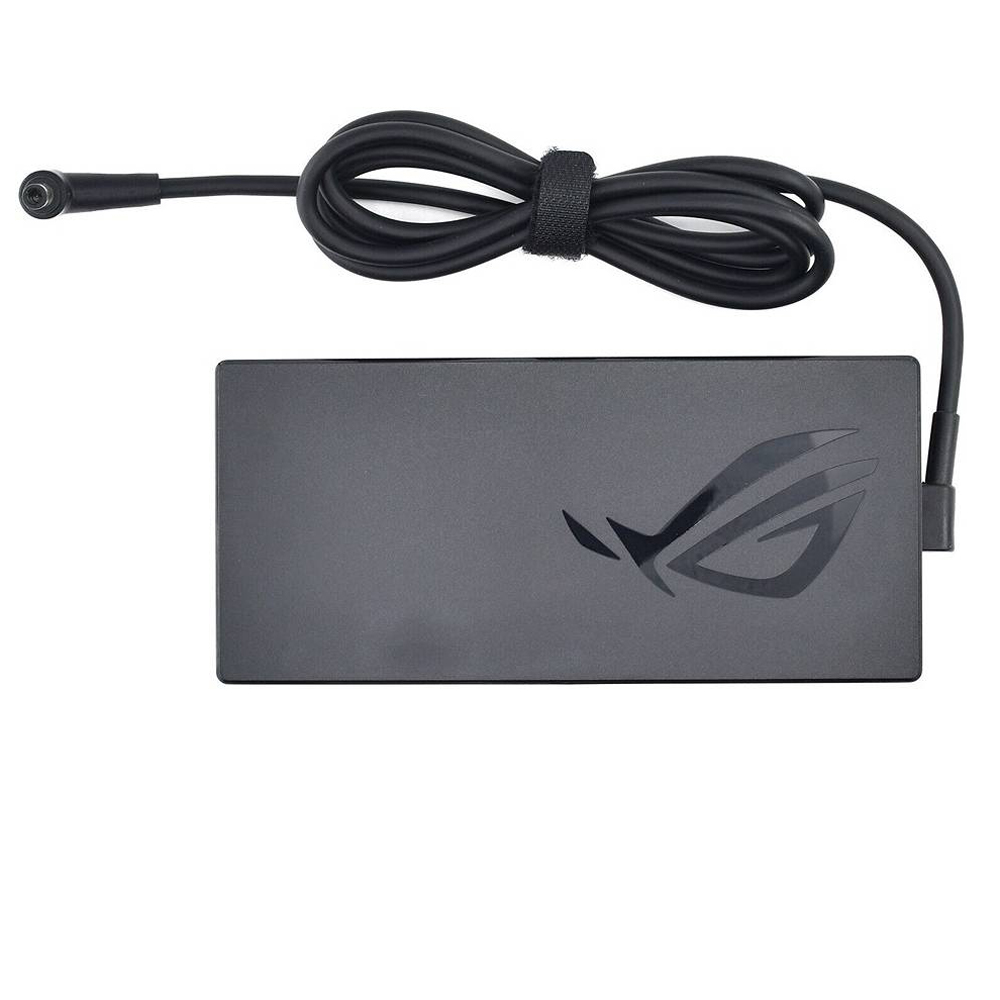
View 20V 12A 240W Asus 6.0mm x 3.7mm AC Adapter
1. When do you need a new 240W Asus charger?
Most customers start searching for a replacement adapter only after something goes wrong. Common situations
include:
- The original Asus adapter is lost or left behind at work, school or a hotel.
- The cable is frayed, bent near the plug, or has exposed metal.
- The power brick gets unusually hot, makes noise, or has a burnt smell.
- The laptop shows “plugged in, not charging” or shuts down when gaming on AC power.
- A lower-wattage universal adapter was used and the laptop throttles or is unstable.
At this stage, the key question is: do you only need a new charger, or is the battery also failing?
A quick test is to:
- Check if the laptop charges correctly when completely shut down.
- Test with another known-good Asus 240 W adapter, if available.
- Check the original adapter for visible damage or a broken connector.
If the symptoms clearly follow the adapter, a quality replacement 20V 12A 240W charger is the right next step.
2. Confirming the technical requirements of your Asus laptop
Before buying, you should confirm three technical details to avoid under-powered or incompatible chargers:
2.1 Output voltage and current
Look at the label on your original Asus adapter or in the laptop’s documentation. For the product in this guide,
you should see something like:
- Output: 20 V
- Current: 12 A
- Power: 240 W
Your replacement adapter should match these values. A lower-wattage charger (for example 180 W) may work
at idle, but can cause throttling, instability or sudden shutdowns under heavy load.
2.2 Connector size – 6.0 mm x 3.7 mm
Asus gaming and ProArt laptops use several different barrel connectors. This 240 W adapter uses the
6.0 mm (outer) x 3.7 mm (inner) round plug. Visually it looks similar to other
sizes, so the safest approach is to:
- Compare the plug in the product photo with your original adapter.
- Check that your laptop is listed in the compatible model list.
2.3 Worldwide input voltage
The adapter is specified with:
- Input: 100 – 240 V, 50 – 60 Hz
This means it can be used in most countries worldwide. The package includes:
- 1 x Asus Charger
- 1 x Power Cord (fit your country)
For travellers and international students, this ensures the adapter works with local mains voltage when the
appropriate cable is provided.
3. Checking compatibility by part number and model
Once voltage, current and connector size match, the next step is confirming compatibility by part number and
laptop model. This is especially important for powerful Asus devices that can ship with 200 W or 240 W
options depending on configuration.
3.1 Compatible part numbers (examples)
This 20V 12A 240W Asus 6.0mm x 3.7mm adapter is designed as a replacement for several original Asus references,
including (partial list):
Asus 0A001-00392200, 0A001-00392300, 0A001-00392500, 0A001-00392600, 0A001-00393200, 0A001-00393300,
0A001-00393400, 0A001-00970000, 0A001-00970100, 0A001-00970200, 0A001-00970300, 0A001-00970400,
0A001-00970700, 0A001-00970800, 0A001-00970900, 0A001-00971000, 90XB05IN-MPW090, 90XB06MN-MPW,
90XB06MN-MPW000, A20-240P1A, AD240-00E, ADP-240EB B, ADP-240EB BD…
If you can still read the label on your original Asus adapter, compare the part number with this list.
A match is a strong indication that the replacement will be compatible.
3.2 Compatible Asus model families
The same 240 W power profile is used across a wide range of Asus models, including high-end gaming and
content-creation laptops such as:
- Asus TUF Gaming A15 / A17 / F15 / F17 / F16 series (for example FA507, FA707, FX507, FX707, FX607…)
- Asus ROG Strix G and ROG Strix Scar 15 / 17 series (G513, G713, G733 and related codes)
- Asus ROG Zephyrus G14 / G15 / G16 and ROG Zephyrus Duo models
- Asus ROG Flow X16 and other ROG Flow systems that ship with 240 W adapters
- Asus ProArt StudioBook and VivoBook Pro series with dedicated GPUs
- Asus ExpertBook B6 and certain high-power workstation-class models
The full compatibility list on the product page covers hundreds of combinations – from TUF Gaming A15 FA507NU
and FA507XI to ROG Zephyrus G14 GA402 series, G15 GA503, Zephyrus M16 GU603 and various ProArt StudioBook 16
and 17 variants. If you find your exact model name there, you can order with confidence.
4. Reviewing the product details before adding to cart
On the product page, you will see a concise specification block. For this adapter it includes:
- Item Condition: Brand New
- Color: Black
- Input: 100 – 240 V, 50 – 60 Hz
- Voltage (Output): 20 V
- Current (Output): 12 A
- Output Power: 240 W
- Connector Size: 6.0 mm x 3.7 mm
- Package Includes: 1 x Asus Charger + 1 x Power Cord (fit your country)
- Warranty: 12 Months / 30-Day Return
This combination makes the adapter suitable for demanding workloads like gaming, 3D rendering, video editing
and software development on powerful Asus platforms.
5. Placing your order – what information to double-check
Once you are satisfied that the voltage, current, connector size and compatibility match, you can proceed to
checkout. Before confirming the order:
- Ensure the shipping address and postcode are accurate.
- Provide a reliable email and phone number for delivery notifications.
- If possible, keep a note of your Asus laptop model and part number in case customer support needs it.
The 30-day return option and 12-month warranty provide additional reassurance if any compatibility or
quality issues arise.
6. Receiving and testing your new Asus 240W charger
When the adapter arrives, the first step is a quick visual inspection:
- Check that the housing and cables are intact and undamaged.
- Verify that the connector is the expected 6.0 mm x 3.7 mm barrel plug.
- Confirm that the label on the adapter shows 20 V and 12 A output (240 W).
For the initial test:
- Connect the mains power cord to the adapter and plug it into a wall socket.
- Insert the 6.0 mm x 3.7 mm connector into your Asus laptop’s DC-in port.
- Check that the charging LED on the laptop and/or power jack lights up as expected.
- In Windows, confirm that the battery icon now shows “plugged in, charging”.
- Optionally, run a short gaming or rendering session to verify that the laptop remains stable under load.
If everything works correctly, you can confidently retire the damaged or under-powered adapter.
7. Daily use and care of a 240W Asus power adapter
A 240 W charger is a high-power device and benefits from a few best practices:
- Place the power brick on a hard surface with good airflow; avoid covering it with blankets or bags.
- Avoid sharp bends at the point where the cable meets the adapter or the laptop connector.
- Unplug by holding the plug, not by pulling on the cable.
- Use a surge-protected outlet where possible, especially in areas with unstable mains power.
- When travelling, coil the cables loosely and avoid crushing them in a tightly packed bag.
Following these practices reduces stress on the connector and internal components, extending the life of
your new 240 W adapter.
8. Summary – a structured way to choose the right Asus 240W charger
From the customer’s point of view, the complete buying process for a
20V 12A 240W Asus 6.0mm x 3.7mm AC adapter follows a clear sequence:
- Recognise the need – lost, damaged or unreliable original charger.
- Confirm technical data – 20 V, 12 A, 240 W, 6.0 mm x 3.7 mm connector.
- Match part numbers and Asus model name with the compatibility list.
- Review product specifications, warranty and return policy.
- Place the order with accurate contact and delivery details.
- Inspect and test the new adapter upon arrival.
- Use and store the charger carefully to maximise its service life.
Following these steps helps ensure that you select a charger that fully supports the performance of your
Asus ROG, TUF, Zephyrus, ProArt or VivoBook Pro laptop without compromise.
Check price and compatibility for the 20V 12A 240W Asus 6.0mm x 3.7mm adapter
This 20V 12A 240 W adapter is designed as a high-quality compatible replacement for original Asus
power supplies using the 6.0 mm x 3.7 mm connector. Always verify the specifications and
compatibility information before purchase to ensure a perfect match for your laptop.