High-performance ASUS laptops (gaming, creator, workstation-class) can pull far more power than a typical 65W–100W adapter. If you use a charger that’s underpowered—or the wrong connector—you may see slow charging, battery drain while plugged in, performance throttling, or a charger that overheats and becomes unreliable.
This guide is written for DIY users replacing a lost/damaged adapter and for professional repair shops that need a fast, repeatable way to confirm the correct wattage and connector type.
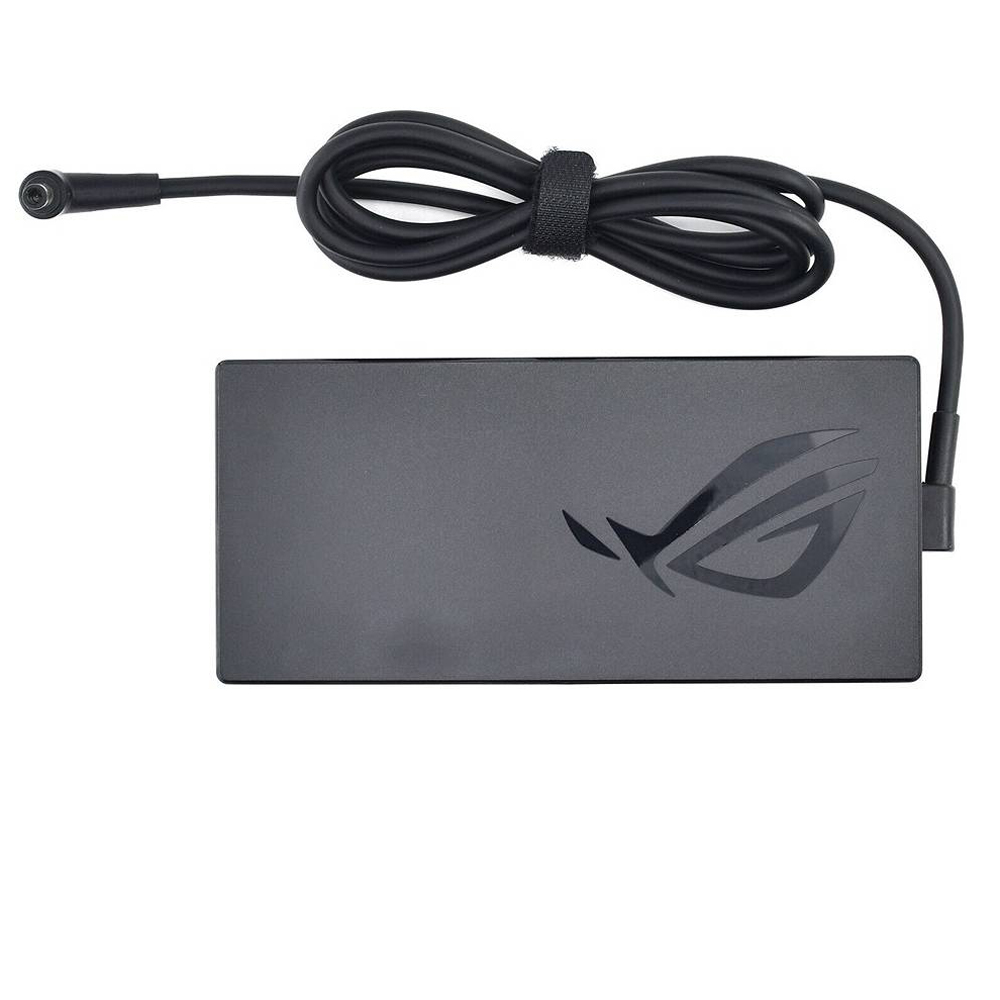
Recommended Replacement: 240W ASUS 6.0mm × 3.7mm AC Adapter
- Output: 20V ⎓ 12A (240W)
- Input: 100–240V ~ 50–60Hz
- Connector size: 6.0mm × 3.7mm
- Condition: Brand New
- Package: 1 × ASUS charger + 1 × power cord (fits your country)
- Warranty: 12 Months / 30-Day Return
Pro tip: A “USB-C plug” charger is not the same as this adapter. This model is a high-power barrel-style 6.0mm × 3.7mm connector (common on many ROG / TUF / ProArt systems). Always match by connector size + output wattage first.
1) What is a 240W ASUS 6.0mm × 3.7mm charger?
This adapter is a high-output AC power supply designed for laptops that can draw significant power under load. Its output rating is 20V ⎓ 12A, which equals 240W.
Key specs:
| Specification | Value | Why it matters |
|---|---|---|
| Output voltage | 20V | Must match your laptop’s required adapter voltage (check label on your original charger). |
| Output current | 12A | Provides high current headroom for gaming/creator workloads. |
| Power | 240W | Avoids “battery drain while plugged in” and performance throttling on high-power laptops. |
| Connector | 6.0mm × 3.7mm | Physical fit is critical—wrong size may not connect properly or may be unsafe. |
| Input | 100–240V ~ 50–60Hz | Supports worldwide mains voltage with the correct power cord. |
Connector note: many ASUS 6.0mm × 3.7mm adapters use a center-pin style barrel. If your original plug has a visible center pin inside the barrel, match that style exactly.
2) Why some ASUS laptops require 240W (and what happens if you use less)
High-performance laptops can pull significant power for the CPU, GPU, display, and charging the battery at the same time. During gaming or rendering, total system draw may exceed what a smaller adapter can deliver consistently.
What you may see with an underpowered adapter
- Slow charging (especially while the laptop is in use)
- Battery drains while plugged in during gaming or heavy workloads
- Performance throttling (reduced GPU/CPU boost behavior)
- Adapter overheating or frequent cut-outs
- System warnings about adapter wattage (on some models)
A properly matched 240W adapter gives the laptop the headroom it needs to run at full performance and charge normally.
3) Compatibility checklist: wattage, voltage, and connector
Use this order to match correctly. This reduces “wrong charger” returns and avoids power instability.
3.1 Match the output first (most important)
- Voltage: your original charger label should show 20V.
- Wattage: your original charger label should show 240W (or 20V × 12A).
3.2 Match the connector size exactly
- Confirm the barrel plug is 6.0mm × 3.7mm.
- If your original has a center pin, confirm the same style (do not assume “similar looking” is safe).
3.3 Match by part number if available (best practice for repair shops)
If you have the original adapter, read the part number on the label and match it against the compatible part numbers list below.
4) Compatible part numbers (not all)
If your original adapter label contains one of these part numbers, this 240W charger is typically the correct replacement family:
- Asus 0A001-00392200
- Asus 0A001-00392300
- Asus 0A001-00392500
- Asus 0A001-00392600
- Asus 0A001-00393200
- Asus 0A001-00393300
- Asus 0A001-00393400
- Asus 0A001-00970000
- Asus 0A001-00970100
- Asus 0A001-00970200
- Asus 0A001-00970300
- Asus 0A001-00970400
- Asus 0A001-00970700
- Asus 0A001-00970800
- Asus 0A001-00970900
- Asus 0A001-00971000
- Asus 90XB05IN-MPW090
- Asus 90XB06MN-MPW
- Asus 90XB06MN-MPW000
- Asus A20-240P1A
- Asus AD240-00E
- Asus ADP-240EB B
- Asus ADP-240EB BD
Note: This is a partial list (“not all”). The fastest confirmation method remains: match the adapter label output + connector size.
5) Compatible model families (grouped)
This 240W 6.0mm × 3.7mm adapter family commonly appears in high-power ASUS lines. Below is a grouped summary based on your provided model list. (Model naming can be long—repair shops should still confirm by adapter label or part number whenever possible.)
5.1 ASUS ROG (gaming & performance)
- ROG Strix (many G-series and SCAR variants)
- ROG Zephyrus (G14 / G15 / G16 / M16, Duo series)
- ROG Flow X16 (GV601 variants)
- ROG desktop-style systems (e.g., ROG GR8 II, Huracan models)
5.2 ASUS TUF Gaming
- TUF Gaming A15 / A16 / A17 (FA/FX series)
- TUF Gaming F15 / F16 / F17 (FX series)
5.3 ASUS ProArt / Creator systems
- ProArt StudioBook 15 / 16 / 17 and Pro variants
- ProArt Station / creator-focused desktop-style units
- ZenBook Pro Duo / creator-oriented ZenBook Pro lines
5.4 ASUS VivoBook Pro / ExpertBook
- VivoBook Pro 15X / 16 / 16X (selected high-power configurations)
- ExpertBook B6 (B6602FC2)
If you want, you can also keep the complete “Compatible Model Series” list on the product page (best for SEO and accuracy), and keep the blog focused on how to choose the correct charger without overwhelming readers.
6) Common power issues this charger solves
6.1 “Battery drains while plugged in” (especially in games)
This is a classic symptom of an underpowered adapter. The laptop draws more power than the adapter can supply, so it supplements power from the battery. A properly rated 240W adapter often eliminates this behavior.
6.2 “Slow charging” during normal use
If your system used to charge faster but now crawls, check that you’re not using a lower-wattage adapter of a similar connector. Many laptops will still operate but will charge slowly or not at all under load.
6.3 Performance throttling when on AC power
Some systems reduce boost behavior if they detect insufficient adapter wattage. A correct 240W adapter can restore expected performance behavior.
6.4 Adapter overheating or frequent disconnects
A stressed adapter running near its limits can get very hot or become unstable. Using the correct wattage reduces stress and improves reliability.
7) Troubleshooting: not charging / slow charging / overheating
Step 1: Confirm you’re using the correct connector
- 6.0mm × 3.7mm must match.
- Confirm center-pin style if your original uses it.
- If the plug feels loose or works only at an angle, the laptop’s DC jack may be worn or damaged.
Step 2: Confirm the laptop is not in a battery health limit mode
Some ASUS systems can cap charging to protect battery lifespan (common limits are around 60% or 80%). If your battery stops at 80%, it may be a setting, not a fault.
Step 3: Rule out thermal limits
On gaming laptops, high temperature can reduce charging speed. If the laptop is extremely hot, allow it to cool and retry charging. Charging behavior often improves when thermals are under control.
Step 4: Check for “battery drain while plugged in” under load
If your battery still drains while gaming with a correct 240W adapter, consider:
- DC jack / port wear (intermittent contact)
- Power management settings or firmware issues
- Battery health issues (a worn battery can behave unpredictably)
Step 5: If the adapter overheats
- Ensure airflow around the adapter brick (don’t bury it in bedding or tight cable bundles).
- Inspect the cable for damage or tight bends.
- Confirm the laptop isn’t drawing extreme sustained power due to background stress (heavy CPU/GPU load all the time).
8) Best practices for DIY users
8.1 Match by label before you buy
The safest approach is to read your original adapter label. If it says 20V and 240W, and the connector is 6.0mm × 3.7mm, you’re usually set.
8.2 Don’t assume “same plug shape” means compatible
Many barrel connectors look similar. The wrong size can lead to loose connections, charging instability, or damage risk.
8.3 Keep cables healthy
- Avoid sharp bends at the connector and brick.
- Don’t pull the laptop by the cable.
- Use strain relief and avoid repeated twisting.
8.4 Desk setup tip
If your laptop is used mostly plugged in, consider enabling ASUS battery health charging limits (when available) to reduce long-term battery wear.
9) Repair shop checklist (fast intake + fewer comebacks)
9.1 Intake questions (high signal)
- Was the original charger 240W? (photo of label saves time)
- Is the complaint slow charge, battery drain while plugged in, or no charge?
- Does the DC jack feel loose or charge only at an angle?
- Is the system a gaming/creator model that regularly runs high load?
- Any battery swelling or battery health warnings?
9.2 Bench verification workflow
- Label match: confirm 20V and 240W requirement on original adapter label (or service data).
- Connector match: confirm 6.0mm × 3.7mm and center-pin style if applicable.
- Known-good test: test with a confirmed 240W adapter and observe charge behavior under moderate load.
- Port inspection: if intermittent, investigate DC jack / board-level damage before replacing adapters repeatedly.
- Customer education: explain that 80% charge may be a battery health setting, not a defect.
20V 12A 240W ASUS 6.0mm × 3.7mm AC Adapter Charger
FAQ
Is it safe to use a higher-wattage adapter?
Only use the wattage class your laptop is designed for. If your original adapter is 240W, a correct 240W replacement is ideal. Do not “upgrade wattage” unless the voltage and connector are exactly correct and the laptop supports it.
My laptop charges, but the battery still drains while gaming. Why?
This often happens when the adapter is underpowered, the connection is unstable (worn DC jack), or the system is drawing extreme power. A correct 240W adapter and a solid port connection usually resolves the underpowered-adapter cause.
Why does my battery stop at 80%?
Many modern ASUS systems can limit charge to protect battery lifespan (common limits are 60% or 80%). Check your ASUS battery health charging settings before assuming the adapter is faulty.
How do I confirm this is the right adapter?
Match the original adapter label (20V, 240W) and confirm the connector is 6.0mm × 3.7mm (including center-pin style if present). If you have a part number like A20-240P1A / ADP-240EB, match it against the compatible part numbers list.